DV.com

Matthew Caldwell

MovingPicture 2.11
StageTools, $199 ($69 for rotation option)

High-Res Still Panning and Zooming Utility

 
DV Score:
Pros: Bare-bones interface makes simple pans and zooms easy. Flash, audio, and multiprocessing support on Windows.
Cons: Limited access to codec options in standalone utility; clunky timeline and viewer. Mac standalone not feature-equivalent.
Bottom Line Stick to using it as a plug-in in your NLE and you'll cut down on your compositor trips.

StageTools: MovingPicture 2.11

The idea behind MovingPicture (http://www.stagetools.com/) is simple yet ingenious: pan and zoom high-res stills and textures without leaving your NLE. Anyone who works on a "no shoot" budget or edits historical subject matter will immediately realize MovingPicture's value.

MovingPicture's interface is basic. It lacks support for multiple layers (although the standalone can dissolve two pictures), Bezier handles in the motion paths, and RAM preview. StageTools figures you'll move to a compositor for more complex work.

Although MovingPicture's interface is easy to use, its bare- bones controls could use some beefing up. For example, you can't scrub the timeline-you must either click on the timeline or hit play and then stop on the viewer.

MovingPicture is available as a standalone utility, but you're probably better off using the NLE plug-in. With the Mac standalone, I wasn't able to access each codecs' custom options (e.g., Sorenson Pro's myriad settings), only the percentage of quality through MovingPicture's dialog box. I couldn't test the PC standalone's audio feature on my DigiSuite workstation because MovingPicture locked up when trying to play back audio from the timeline.

Despite problems with the standalones, MovingPicture really shines as a plug-in. In Premiere, for example, you put a clip into the timeline, edit the clip to the length of your move, then launch MovingPicture as a filter. Once the move is rendered, you can edit it into your timeline and add transitions as you would any other clip.

It's not going to work with every still move you need; but if you work a lot with high-res stills, it probably will cut your compositor trips in half.


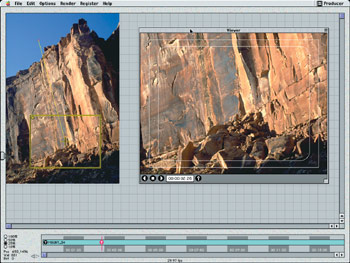
MovingPicture's camera is different from those in most compositors. Instead of manipulating the picture in the camera view, you move, scale, and rotate the camera view over the picture to move across the cliff's face.

 
MovingPicture 2.11
System Requirements: PC: Win95, 98, NT, Me, 2000, and XP; 90MHz Pentium-class processor (300MHz rec.); 32MB RAM (64MB to 128MB rec.). Mac: Mac OS 7.0 or higher; PowerPC; 32MB or more. NLEs: Plugs into Adobe After Effects (PC/Mac), Avid (PC/Mac), Discreet edit, DPS dpsVelocity, Pinnacle Systems Faststudio, Apple Final Cut Pro, IMC Incite, LightWorks, Media 100 (Mac), NewTek Toaster Edit 2 (Q1 '02), Adobe Premiere (PC/Mac), Canopus RexEdit/DVStorm, in-sync SpeedRazor, and United Media On-Line Express.

Matthew Caldwell is a promotions editor at the Shop At Home Network in Nashville, TN.

Copyright©2002 CMP Media Inc. All Rights Reserved.